
Project Email Management and Governance for AEC Firms
Every construction project generates thousands of emails. Approvals, design changes, RFI responses, and client instructions move through inboxes daily. Yet most of that correspondence never makes it into the formal project record. Instead, it remains in a personal inbox, where only the original intended recipient can access it, making it invisible to project teams, auditors, and legal counsel when it matters most.
For IT and compliance teams in AEC firms, this is a governance gap with real consequences. Unmanaged email creates version confusion, complicates audits, and leaves firms exposed during disputes. When institutional knowledge lives in individual inboxes rather than the project record, continuity breaks when team members change roles or leave.
The solution is not simply to archive more email. Archiving preserves messages. Project email management helps ensure that mission-critical project information is captured and filed with the right project content, so teams can find it when they need it. Let’s better understand why project email management is a governance priority for AEC firms, how contextual email capture differs from archiving, and what IT and compliance buyers should look for in a solution.
Let’s jump in and learn:
- Main Takeaways
- Why Project Email Is a Critical Governance Gap for AEC Firms
- What Contextual Email Capture Means for IT and Compliance Teams
- How Unmanaged Project Email Creates Version Confusion, Audit Gaps, and Legal Risk
- What to Look for in a Project Email Capture and Governance Solution for AEC
- How Egnyte's Email Capture Connects Project Correspondence to Governed Content
- Conclusion
Main Takeaways
- Project email management is a governance function. Unmanaged email creates audit gaps, legal exposure, and version confusion. IT and compliance leaders must treat it as a records problem, not a collaboration issue.
- Contextual email capture links correspondence to the project record. It adds context to messages and attachments, making them searchable and governed alongside project files.
- Construction email management protects institutional knowledge. When correspondence is filed to the project rather than a personal inbox, knowledge stays with the project when team members change roles or leave.
- Governed project email reduces dispute exposure. As per the 2026 Arcadis Global Construction Disputes Report, the average average North American construction dispute costs $56 million and takes 12.2 months to resolve. A defensible email record is critical evidence.
- Egnyte’s Email Capture connects Outlook with Egnyte project folders. It files messages and attachments, keeps email threads together, and makes filed emails searchable by date, sender, subject, and document type.
- Automated filing reduces filing effort and enforces consistent structure, so teams can spend less time sorting emails manually across projects.
Why Project Email Is a Critical Governance Gap for AEC Firms
Important project decisions often live in people’s inboxes. Approvals, design clarifications, scope changes, and client instructions can be difficult for others to find when they are not filed with the relevant project information. For IT and compliance teams, this makes it harder to keep track of important project information and maintain a complete project record.
Email can become a problem when each person handles project correspondence differently. A decision may be easy for the person who received it to find, but much harder for someone else on the team. Without a governed process, correspondence remains scattered, which makes it difficult for teams to piece together the history behind various critical decisions.
But the issue isn’t limited to individual projects. It has a lasting impact on the organization. If an employee leaves or their role changes, the information may disappear as well. Project email management addresses this gap by moving correspondence from personal inboxes into the governed project record, where it can be accessed, searched, and audited alongside other project content.
What Contextual Email Capture Means for IT and Compliance Teams
Project emails often contain information that belongs with the rest of the project. Contextual email capture gives teams a way to put that information there. An approval, RFI response, or client instruction can be filed with the project files and folders it relates to, instead of remaining in an inbox.
For IT and compliance teams, this keeps project information together, making it easier to find. Contextual email capture sits firmly in the governance pillar, alongside audit controls.
Key governance benefits include:
- Project context: Correspondence gets filed with the relevant project information instead of sitting in an inbox.
- Searchability: Filed messages can be found by date, sender, subject, and document type.
- Controls: Captured emails can be managed with the permissions and other controls applied to project content.
- Evidence: A consistent filing process makes project correspondence easier to retrieve when audits, questions, or disputes arise.
This is where project correspondence management differs from simple email archiving. Archiving keeps a copy of the message. Contextual capture puts it with the project information it belongs to.
How Unmanaged Project Email Creates Version Confusion, Audit Gaps, and Legal Risk
Unmanaged project email creates specific, measurable risks for AEC firms. These risks land on IT and compliance teams to address.
Version Confusion
A design clarification can sit in one inbox while the team works from another revision. The same can happen with a material approval that never reaches the project folder. Without consistent construction email management, important decisions can get missed, and teams may end up working with outdated information.
Audit Gaps
Finding the right correspondence can take time when emails are spread across personal inboxes. Some messages may also be deleted or become difficult to access later. For IT and compliance teams, that makes it harder to pull together a complete project record when an audit requires it. CMMC also places requirements on systems that handle Federal Contract Information (FCI) and Controlled Unclassified Information (CUI).
Legal Exposure
Construction disputes get resolved on documentary evidence. When emails exist only in personal inboxes, they are invisible to project managers, lawyers, and adjudicators when it matters most. A missing approval can complicate a dispute. Fragmented correspondence can slow an audit. The average North American dispute costs $56 million and takes 12.2 months to resolve. A defensible email record is not optional.
Knowledge Loss
When correspondence is filed against projects rather than held in inboxes, continuity is preserved. When filing breaks, institutional knowledge disappears with the person who held it. Project email management ensures that knowledge stays with the project.
What to Look for in a Project Email Capture and Governance Solution for AEC
IT and compliance buyers should evaluate email capture construction solutions against these capabilities:
Capability | Why It Matters |
Outlook integration | Users file messages within existing workflows. The solution must work where teams already communicate. |
Folder mapping | Emails and attachments route to the correct project folders. Automated mapping scales across teams. |
Thread filing | The full conversation is preserved, not just individual messages. Context matters for governance. |
Search | Find messages by date, sender, subject, and document type. A project record email is only useful if it can be retrieved. |
Governance controls | Permissions, retention, and audit trails can extend to filed emails, keeping them under the same controls as other project content. |
Automation | Automated filing reduces the need for users to sort emails manually. That matters when teams are handling correspondence across multiple projects. |
These capabilities make construction email management easier across the project lifecycle.
How Egnyte's Email Capture Connects Project Correspondence to Governed Content
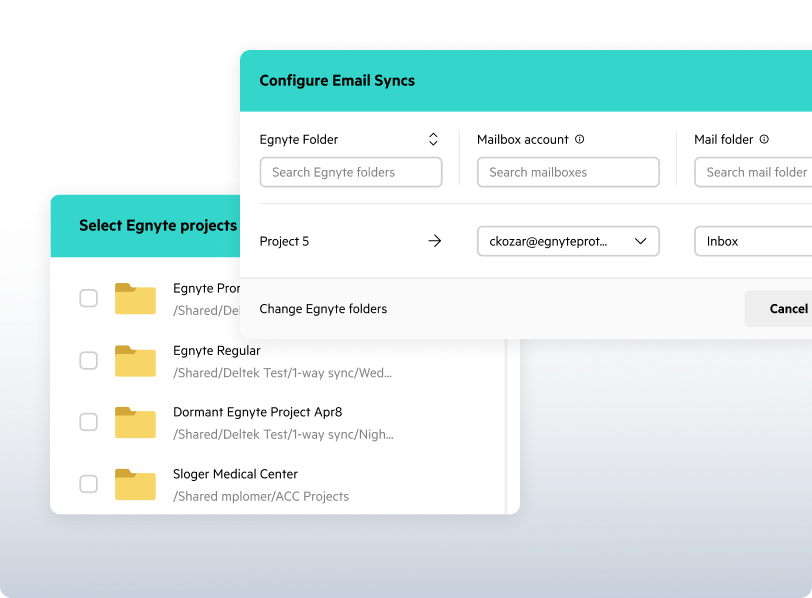
Egnyte Email Capture connects Microsoft Outlook with Egnyte, so teams can file emails and attachments directly into the project folders where they belong. Once filed, project correspondence sits alongside the other information teams need to reference, while remaining searchable and governed as a part of project content.
Key Capabilities
- Outlook filing: File an email from the Outlook sidebar without switching between applications.
- Thread filing: Keep an entire email conversation together, rather than filing messages one at a time.
- Automated filing: Administrators can link Outlook folders to Egnyte project folders. Move an email into a mapped folder and it is filed automatically, with emails organized by year and month.
- Search: Find filed emails across a project using details such as date, sender, subject, or document type.
Governance Integration
Once filed, emails become part of the structured project record. They are governed alongside the rest of your project content in Egnyte. This creates one complete picture for each project, with nothing scattered across personal inboxes or disconnected archives.
Conclusion
Project email management is not a nice-to-have collaboration feature. It is a governance capability that protects your firm from audit gaps, legal exposure, and operational risk. A governed process moves correspondence from personal inboxes into the project record, making it searchable, accessible, and defensible.
For IT and compliance teams, the question is not whether to manage project email, but how to do it consistently across the organization. Contextual email capture provides the answer by linking correspondence to project files and applying governance controls that reduce risk.
Contextual Email Capture connects Outlook to governed workspaces, making project email part of the record. The knowledge that drives your projects already exists in email. It just needs to live where the work does.
Frequently Asked Questions
Project email capture moves relevant correspondence from personal inboxes into the project record, where the team can find it with the other information it relates to. Approvals, scope decisions, RFI responses, and client instructions may matter long after an email is sent. Without a way to file them, those records can remain tied to one person’s inbox. For AEC firms, a clear capture process makes project email management easier to handle and helps keep important project information accessible when people change roles or leave.
Important decisions can get buried when project correspondence stays in individual inboxes. A missing approval may become an issue during a dispute, while a design clarification can be overlooked if the team is working from another revision. Emails that are difficult to find can also slow down an audit. Construction email management helps close these gaps by giving relevant messages a place within the project. It also supports project correspondence management by reducing dependence on individual filing habits and keeping important information with the project.
There is no single retention period that applies to every AEC project. Requirements can depend on the contract, the type of information involved, and the organization handling it. Firms working with Controlled Unclassified Information (CUI) under applicable DoD contracts may have CMMC-related security obligations, while individual contracts can add other requirements. ISO 19650 provides a framework for managing project information across the built environment. IT teams should identify the requirements that apply to their projects and reflect them in their project email management policies and processes.
For AEC firms that manage Controlled Unclassified Information (CUI) or Federal Contract Information (FCI) on DoD projects, it is mission-critical to protect email correspondence. EgnyteGov’s advanced security controls support CMMC requirements, including classification of potential CUI in data repositories that are monitored. You can learn more about Egnyte’s CMMC solutions here. Similarly, Contextual Email Capture extends baseline governance protection to project correspondence. When emails are filed into governed Egnyte workspaces, they inherit the same access control policies, audit trails, and retention policies as the rest of the project record. To maximize CUI protection, it is recommended that you map your company’s data flows to determine where CUI could potentially “spill” into non-DoD environments
Capture policies should focus on correspondence that has business, contractual, legal, or compliance value. That can include approvals, change decisions, RFI responses, design clarifications, and client instructions. Routine administrative messages do not necessarily need to become part of the project record. A clear filing process can define what belongs and where it should go. Automated mappings can help apply those rules across projects. The aim of project email management is not to store every message. It is to keep important project correspondence with the information it supports.
Captured emails are most useful when authorized team members can find them alongside the rest of the project information. Contextual Email Capture supports search by date, sender, subject, and document type, while access follows the permissions applied to the project workspace. That means teams do not have to rely on the original sender’s mailbox to find a project record email. The same approach supports project correspondence management by keeping email tied to the project structure. When responsibilities change, the relevant correspondence remains easier to locate.
Contextual Email Capture currently integrates with Microsoft Outlook, allowing users to file emails into project folders. It supports thread filing and automated folder mapping, so teams can keep related correspondence together and route messages to the right project location. Firms should confirm supported Outlook versions and deployment requirements for their environment. For organizations using Outlook as part of their project email management workflow, this provides a direct way to move relevant correspondence into the project workspace. Firms using other email platforms should check current Egnyte support before planning a capture workflow.
Egnyte has experts ready to answer your questions. For more than a decade, Egnyte has helped more than 23,000+ customers with millions of users worldwide.
Additional Resources
Email Capture for Project Records
Preserve business emails as searchable project records.

Simplify Secure File Sharing
Share files from Outlook while maintaining governance.

Remote Collaboration Tools Guide
Enable secure collaboration for distributed project teams.