
Architecture Drawing Management: How Design Teams Control Versions, Access, and Consultant Sharing
Architecture, engineering, and construction teams depend on accurate drawings to keep projects moving. But as projects grow more complex, managing revisions, consultant access, and field distribution becomes harder. One outdated drawing can trigger costly rework, delays, compliance issues, or disputes.
Modern firms need more than shared folders and email attachments. They need centralized construction drawing management software that keeps architects, engineers, subcontractors, and field teams aligned around one trusted source of truth. Modern drawing file sharing software also helps firms simplify consultant coordination, reduce version confusion, and improve secure access to current drawings across offices and jobsites.
Egnyte’s AEC construction solution combines secure collaboration, automated version control, mobile access, and governance into one unified content cloud platform designed for AEC workflows.
Let’s jump in and learn:
- Main Takeaways
- Drawing Management vs. Document Management: Understanding the Difference
- Version Control Through Design Phases: How Architecture Firms Manage Drawing Sets
- Managing Consultant Access Without Losing Control of Design Files
- Issuing Drawing Sets: Workflows for Coordinating Across Disciplines
- Audit Trails for Design Coordination and Regulatory Compliance
- How to Evaluate Architecture Drawing Management Software: A Checklist
- Conclusion
Main Takeaways
- AEC firms reduce drawing confusion by using centralized construction drawing management software with automated version tracking across SD, DD, CD, IFC, and As-Built phases.
- Mobile access and offline sync help field teams access current drawings even when jobsite connectivity is weak or unreliable.
- Secure consultant collaboration depends on role-based permissions, expiring links, and watermarking instead of uncontrolled email attachments.
- Automated audit trails help firms track who accessed, downloaded, or modified drawings, reducing compliance and liability risks.
- Cross-discipline coordination becomes easier when architects, structural engineers, MEP consultants, and civil teams work from one shared platform.
- Egnyte combines drawing file sharing software, secure collaboration, and governance tools into a single system built for modern AEC operations.
Drawing Management vs. Document Management: Understanding the Difference
Drawing management controls the lifecycle of design files, while document management handles broader project documentation.
Many firms still rely on generic document management systems that treat drawings like ordinary files. However, construction drawings require specialized workflows tied to revisions, disciplines, issue sets, approvals, and field coordination.
What Drawing Management Actually Covers
Modern architecture drawing management software manages far more than PDF storage.
It supports:
- Design phases including SD, DD, CD, IFC, and As-Built
- Discipline-specific drawing sets for architectural, structural, MEP, and civil teams
- Revision tracking and markup management
- Transmittal workflows and issue logs
- RFI-driven revisions and approvals
- Drawing distribution to consultants and subcontractors
- Mobile and field access controls
- Drawing audit trails for compliance and claims
With centralized drawing file sharing software, teams can instantly locate the latest approved drawings instead of searching across disconnected folders and inboxes. The best architecture drawing management software also supports how to manage drawing revisions across disciplines by maintaining centralized visibility across architectural, structural, MEP, and civil drawing packages.
Why a Generic DMS Is Not Enough for Drawing Sets
Generic DMS platforms store files, but they rarely support the realities of AEC coordination.
Without purpose-built construction drawing management software, firms often face:
- Duplicate “final_v2_latest” files
- Uncontrolled consultant sharing
- Missing revision histories
- Manual transmittal tracking
- Inconsistent field distribution
- Confusion across disciplines
Unlike generic systems, drawing file sharing software designed for AEC workflows supports structured coordination, secure distribution, and reliable drawing version control AEC teams depend on daily.
Purpose-built systems improve both speed and accountability by adding:
Generic DMS | Construction Drawing Management Software |
Basic file storage | Discipline-aware drawing control |
Manual file naming | Automated version tracking |
Limited permissions | Granular role-based access |
No transmittal workflows | Automated issue tracking |
Weak audit visibility | Complete drawing audit trails |
Static sharing | Secure external collaboration |
Version Control Through Design Phases: How Architecture Firms Manage Drawing Sets
AEC firms ensure teams work from the latest drawings by centralizing all revisions within one controlled platform. Version confusion is one of the biggest risks in design coordination. A single outdated structural or MEP sheet can create costly downstream errors during procurement or construction.
Phase-Based Versioning: SD, DD, CD, and Beyond
Effective drawing version control AEC workflows mirror how projects actually evolve.
Modern firms organize drawings by:
- Schematic Design (SD)
- Design Development (DD)
- Construction Documents (CD)
- Issued For Construction (IFC)
- As-Built revisions
By incorporating structured metadata into architecture drawing management software, teams can quickly filter:
- Current IFC structural drawings
- Latest DD architectural elevations
- Active MEP coordination sets
- Superseded civil revisions
Egnyte helps firms manage drawing revisions across disciplines by centralizing revisions and preserving historical versions automatically. The level of drawing version control AEC teams require becomes especially important when multiple consultants issue revisions simultaneously across large projects.
Automated Version Tracking vs. Manual File Naming
Automated versioning eliminates the risks created by inconsistent file naming.
Manual naming conventions like:
- “A101_FINAL”
- “A101_FINAL_v4”
- “A101_USE_THIS_ONE”
quickly become unmanageable on large projects.
Instead, modern construction drawing management software automatically:
- Tracks every file revision
- Preserves full version history
- Surfaces the latest approved file
- Maintains rollback capability
- Records revision timestamps
- Links revisions to RFIs and issue sets
Using centralized drawing file sharing software also helps firms avoid duplicate uploads and inconsistent revisions across distributed project teams. This improves drawing version control AEC processes while reducing human error and coordination delays.
Managing Consultant Access Without Losing Control of Design Files
The safest way to collaborate externally is to provide controlled access to centralized drawings instead of sending unmanaged files through email.
Architects regularly share drawings with:
- Structural consultants
- MEP engineers
- Civil teams
- Contractors
- Subcontractors
- Owners
- Regulatory reviewers
Without governance, firms lose visibility into who accessed which drawing version.
Role-Based Permissions for Consultants and Subcontractors
Role-based access gives firms precise control over external collaboration.
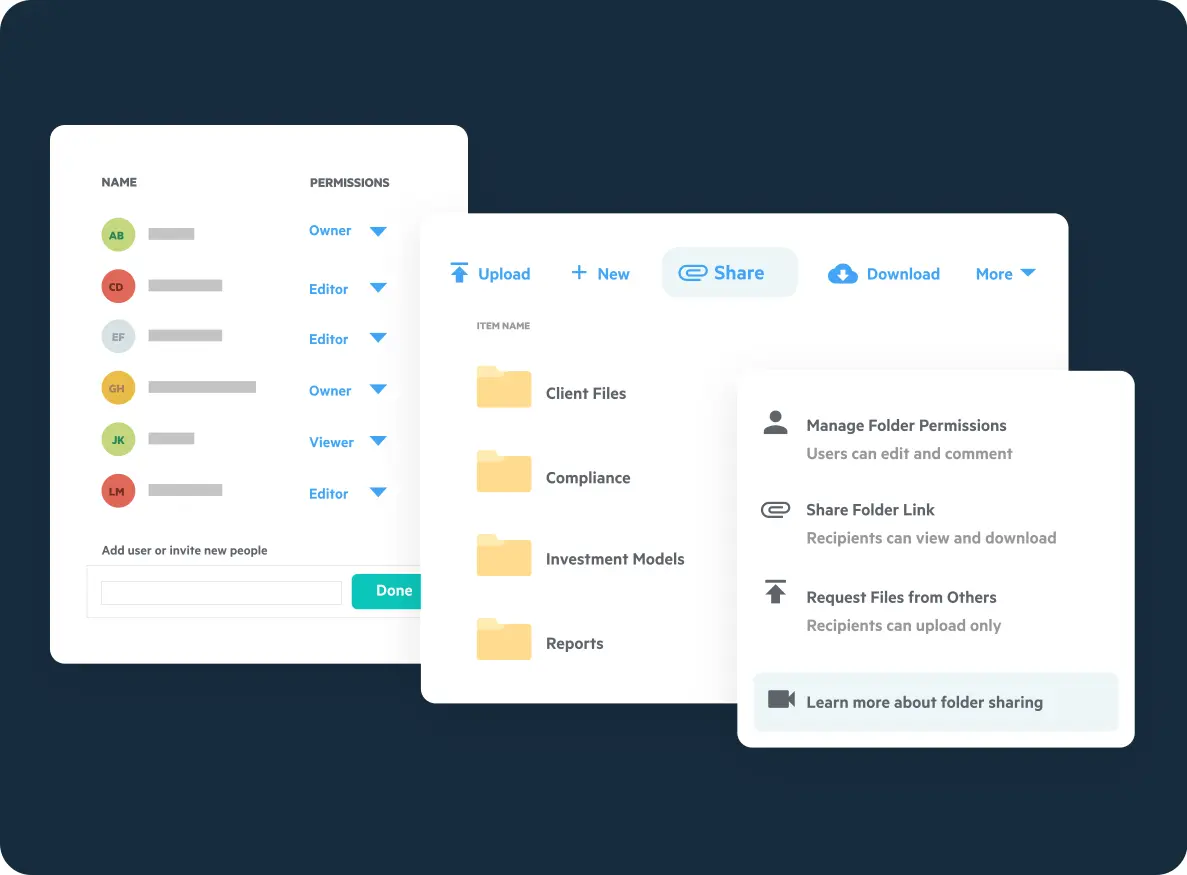
Using Egnyte’s secure external file sharing capabilities, firms can:
- Restrict access by company or discipline
- Limit downloads for sensitive drawings
- Create view-only permissions
- Separate internal and external folders
- Control upload rights
- Remove access instantly
This is one of the most effective ways to handle how to share construction drawings with subcontractors securely. It also transforms ad hoc sharing into structured AEC file collaboration workflows. For firms evaluating how to share construction drawings with subcontractors, centralized access controls provide significantly better visibility and governance than email-based distribution.
Expiring Links and Watermarking for Drawing Distribution
Secure distribution controls reduce compliance and liability risks.
Modern drawing file sharing software should support:
- Password-protected links
- Link expiration dates
- Download restrictions
- Recipient tracking
- Dynamic watermarking
- Access logs
Watermarking adds another layer of accountability by embedding:
- Recipient name
- Company
- Timestamp
- Project details directly onto drawings.
These controls help firms enhance security for sensitive project files and client data without slowing collaboration. This approach allows architecture drawing management software to balance security, usability, and external collaboration across complex AEC projects.
Issuing Drawing Sets: Workflows for Coordinating Across Disciplines
Cross-discipline coordination works best when all teams issue and receive drawings through one centralized system.
Large projects involve continuous coordination between:
- Architects
- Structural engineers
- MEP consultants
- Civil engineers
- Fabricators
- General contractors
- Field supervisors
Without structured issuance workflows, teams struggle to verify which drawing sets were distributed and when.
Transmittal Logs and Issue Tracking
Transmittal logs create accountability during drawing distribution.
Strong construction document control workflows should automatically capture:
- Issue date
- Recipients
- Included sheets
- Revision numbers
- Distribution history
- Approval status
Egnyte supports centralized construction document control workflows that help firms retrieve historical issue sets during audits, disputes, or claims reviews.
Field Access: Getting Current Drawings to Site Teams
Field teams need fast access to current drawings regardless of jobsite connectivity.
Weak internet access remains one of the biggest challenges on active construction sites. Teams often lose time searching for updated plans or accidentally referencing outdated sheets.
Field-ready construction drawing management software should include:
- Mobile apps for tablets and phones
- Offline access and sync
- Cached drawing views
- Automatic superseded file replacement
- Fast search and filtering
- Secure remote access
Reliable drawing file sharing software ensures field teams always access the latest approved revisions, even across remote jobsites with inconsistent connectivity. This improves both productivity and field accuracy while reducing rework.
Audit Trails for Design Coordination and Regulatory Compliance
Drawing audit trails reduce legal and compliance risks by documenting every interaction with design files.
External collaboration creates exposure when firms cannot prove:
- Which drawing version was issued
- Who accessed it
- When it was downloaded
- Whether it was revised later
For regulated projects, this visibility is essential.
What a Drawing Audit Trail Should Capture
A strong audit trail should record every meaningful file interaction.
Effective architecture drawing management software captures:
- Uploads
- Downloads
- Views
- Link sharing
- Permission changes
- Watermark activity
- Revision history
- Mobile access events
- Folder movement
- File deletions
Egnyte’s audit capabilities help firms strengthen governance while supporting claims management and regulatory compliance.
RFI-Driven Revisions and Change Tracking
RFI-driven revisions should follow structured workflows instead of fragmented email chains.
When firms fail to manage revisions systematically, they create:
- Conflicting drawing versions
- Coordination delays
- Field confusion
- Compliance gaps
- Increased rework
The best way to manage drawing revisions across disciplines is to connect RFIs directly to updated sheets and issued sets.
Strong construction drawing management software should:
- Link RFIs to revised drawings
- Preserve revision history
- Notify impacted teams
- Record issue dates
- Maintain version traceability
- Document field distribution
This approach strengthens drawing version control AEC processes and creates a defensible record of design changes. It also improves how to manage drawing revisions across disciplines by connecting RFIs, approvals, consultants, and issued drawing sets within one controlled workflow.
How to Evaluate Architecture Drawing Management Software: A Checklist
The best platforms combine security, collaboration, governance, and field accessibility in one system.
Use this checklist when evaluating architecture drawing management software:
Evaluation Area | What to Look For | Why It Matters |
Version Control | Automatic versioning and rollback | Prevents revision confusion |
Discipline Coordination | Architectural, MEP, structural filtering | Simplifies coordination |
Access Control | Role-based permissions | Protects sensitive files |
External Sharing | Expiring links and watermarking | Secures consultant sharing |
Mobile Access | Offline sync and mobile apps | Supports field operations |
Audit Trails | Activity tracking and exportable logs | Reduces liability risks |
RFI Integration | Linked revisions and issue tracking | Improves accountability |
Scalability | Multi-office and large project support | Supports firm growth |
Integrations | BIM, PM, and collaboration tools | Avoids data silos |
Before selecting a platform, confirm it supports:
- Automated drawing version control AEC workflows
- Secure consultant and subcontractor sharing
- Mobile-friendly field access
- Comprehensive audit visibility
- Reliable construction file sharing
- Integration with existing BIM and PM tools
- Fast retrieval of historical drawing sets
Ensure the platform includes drawing file sharing software capabilities that support secure consultant collaboration and field-ready mobile access.
Conclusion
Architecture drawing management is no longer just about storing files. Modern AEC firms need centralized systems that combine drawing file sharing software, construction drawing management software, secure collaboration, automated version control, mobile field access, and audit-ready governance to keep every team aligned on the latest approved drawings.
Egnyte brings together architecture drawing management software, drawing file sharing software, secure external file sharing, and enterprise-grade AEC file collaboration in one platform purpose-built for architects, engineers, consultants, and construction teams. By simplifying drawing version control AEC workflows and improving how to manage drawing revisions across disciplines, Egnyte helps firms reduce version confusion, strengthen compliance, and protect sensitive project data across every phase of design and construction.
Frequently Asked Questions
Construction firms prevent version confusion by using centralized construction drawing management software that automatically surfaces the latest approved drawings while preserving revision history. Mobile apps, offline sync, and cloud-based access ensure field teams work from one trusted source instead of relying on email attachments or local copies. Automated version control also removes superseded sheets from active workflows, reducing the risk of building from outdated drawings.
The best way to share construction drawings with subcontractors is through centralized platforms with role-based permissions and secure external collaboration controls. Firms can use expiring links, password protection, watermarking, and activity tracking instead of emailing files. Using construction drawing management software also improves audit visibility and drawing version control AEC firms require for compliance while ensuring subcontractors only access relevant drawings.
External sharing creates risk when firms cannot verify which drawing version was shared, accessed, or downloaded. Without detailed audit trails, disputes can arise around outdated drawings or unauthorized distribution. Modern architecture drawing management software reduces these risks by tracking uploads, downloads, permissions, and revision history, helping firms improve compliance and governance across consultant and subcontractor workflows.
The best way to manage drawing revisions across disciplines is to connect RFIs directly to revised drawings and controlled issue sets. Structured workflows maintain timestamps, revision histories, linked RFIs, and documented distribution records. This strengthens drawing version control AEC processes while helping teams manage drawing revisions across disciplines without creating duplicate or conflicting drawing sets.
Effective audit trails should capture uploads, downloads, sharing activity, permission changes, revisions, deletions, and mobile access events. Exportable reporting is also essential for claims reviews and compliance audits. Strong construction drawing management software links audit activity to issue sets, RFIs, and project phases, making it easier to track who accessed specific drawings and when they were distributed.
Egnyte has experts ready to answer your questions. For more than a decade, Egnyte has helped more than 23,000+ customers with millions of users worldwide.
Additional Resources

Document Management for Architects
Centralize and manage architecture documents to improve accuracy and collaboration.
Design Collaboration Best Practices
Align distributed teams with better version control, feedback loops, and real-time design workflows.

Allen Pyke Case Study
How Allen Pyke improved global collaboration and remote flexibility with Egnyte.