Configure the Egnyte Desktop Experience at Scale
Egnyte is extremely powerful, allowing users to work from anywhere. Many users prefer working on a desktop because they rely on powerful desktop applications to create complex content. With Egnyte, administrators benefit from being able to configure the desktop experience for their users. To make it easier for administrators, we’ve improved what until now has been a manual configuration process.
Solving Desktop Configuration Challenges for Administrators
Administrators are often expected to learn a new language to use the tools they need to engineer user experiences for. At Egnyte, we're constantly thinking about how we can benefit all users, especially administrators.
We’ve been working on bringing consistency and parity across Egnyte’s desktop, cloud, and mobile user experiences. However, we know that some work can only be done on a user’s desktop. Administrators recognized this and—up to now—have leveraged Egnyte features such as our desktop drive letter and Mac-mounted drive experiences, connected folders, offline folders, offline sync, and more. They’ve relied on one-off configurations, or even flimsy scripts to maintain desktop experience consistency. That’s about to change for the better—we’ve invested in improving the desktop experience for administrators and their users.
Introducing Desktop Configuration Profiles
To continue helping administrators, we’re introducing new settings that will allow them to configure the user desktop experience at scale.
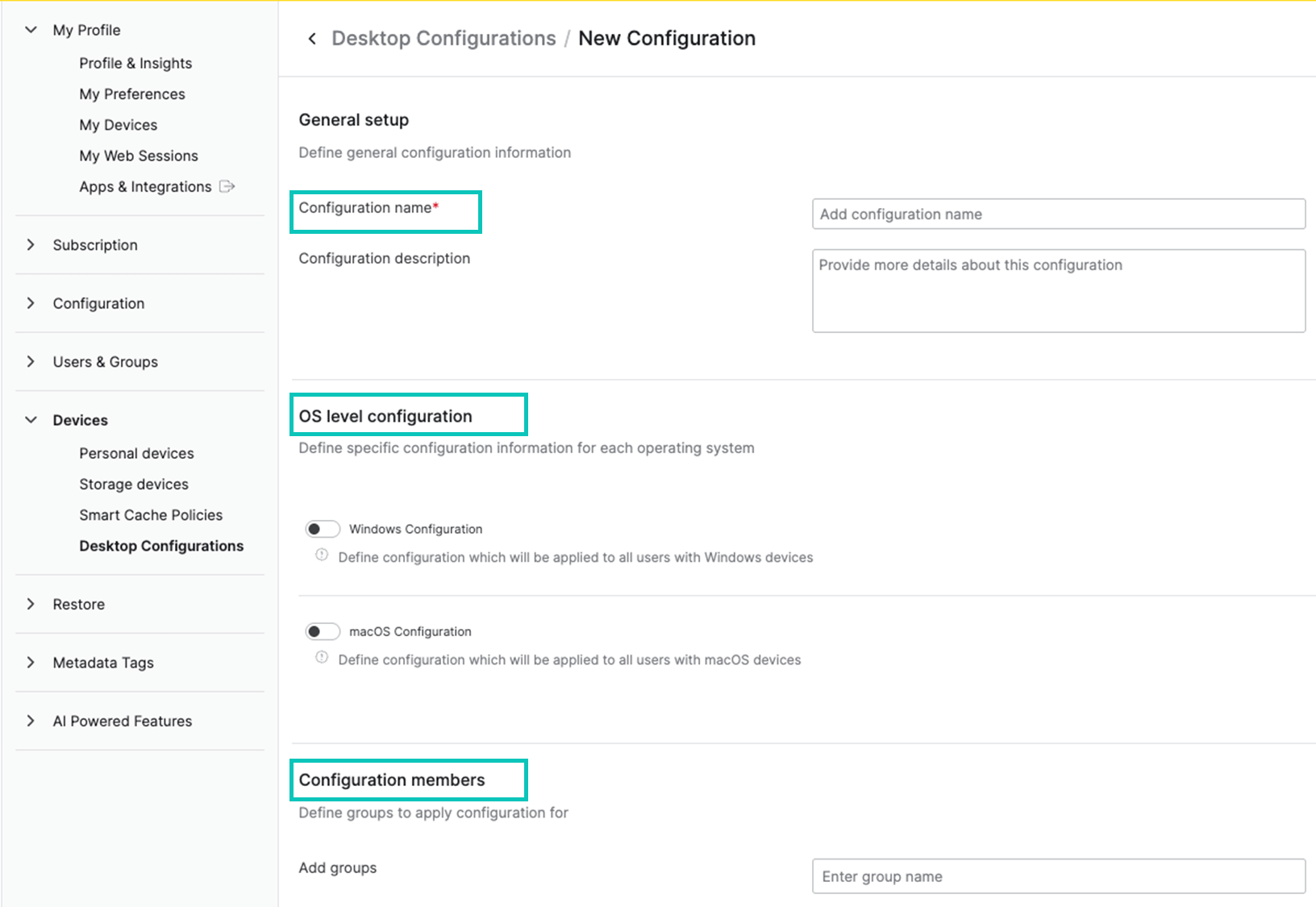
From the web interface settings, administrators can access configuration settings to set up:
- OS-specific configurations: Windows- and Mac-specific controls and labels for consistency and simplification
- Folder settings: Standardized configurations for connected and offline folders for seamless execution for users and ease of configuration for administrators
- User group-specific rollout: Simple rollout to defined user groups for extra control and easy implementation of standardization
☝️These settings also allow administrators to control when and how desktop application software updates make it to their users. They can roll them out to a specific group first or to everyone, or anything in between.
With our new Desktop Configuration Profiles, administrators can deliver essential standardizations and consistency for their desktop users, minus the manual work. All of this is managed through the same intuitive UI that Egnyte is known for.
📣 With Desktop Configuration Profiles, Egnyte administrators can save valuable time and more easily implement essential consistency and standardizations for their desktop users.
Reach out to learn more about how Egnyte supports users and administrators in how they execute.