INCREASE PRODUCTIVITY
- Improve access, collaboration, and speed service delivery
- Eliminate lifecycle management
- Avoid productivity impact from planned or unplanned outages

Unlock the full potential of your mission-critical content by simplifying collaboration, improving productivity with AI, and addressing information governance.
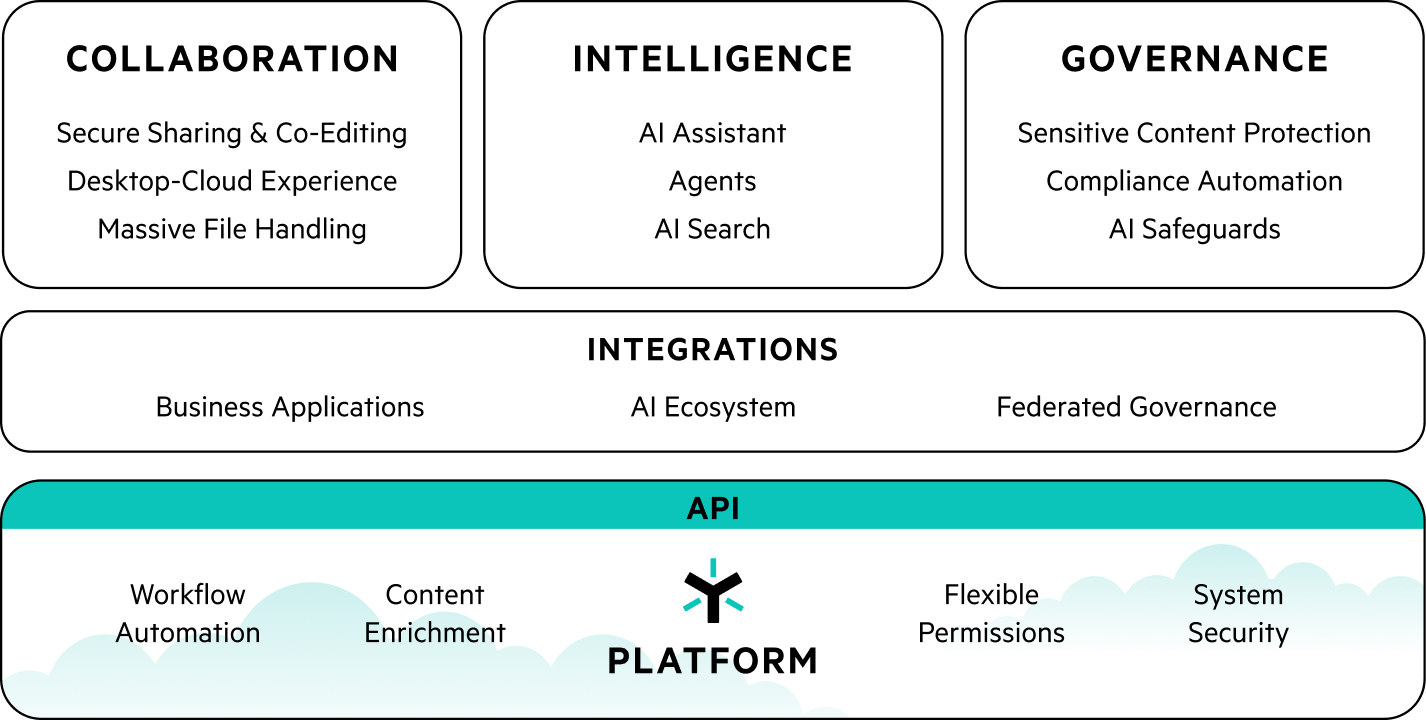


Enterprises need to put content and context-based guardrails in place and focus on the most sensitive data to make sure it is protected.

“The Egnyte Content Intelligence Platform aims to make the management of organization-wide data easier and faster. It helps reduce exposure, which is an important proactive component of privacy and compliance regulations. The platform also includes capabilities such as prebuilt templates for making the process of demonstrating privacy and compliance regulation adherence less time- and resource-intensive and thus faster.”
The Egnyte value assessment will help you assess the current costs of your unstructured file content and understand the savings and value Egnyte’s intelligent content platform can deliver to your organization.
Our trained consultants use third-party-validated benchmarks to quantify your business value across three areas: IT Cost Avoidance, Productivity, and Risk Reduction.
Request Your In-Depth AssessmentAverage annual savings for each major direct cost category along with total annual and three-year average savings (after Egnyte investment) across all assessments
Imagine the end of expensive file servers, legacy hardware, inefficient backups, disaster recovery services, MDM, VPN, DLP and a host of other acronyms. With Egnyte, you can finally retire outdated and under-utilized infrastructure, and eliminate the need for more hardware, more support, more applications.
Want to see how all those savings can add up for your business?
Request Your In-Depth AssessmentAnnual Savings $130K | Three Year Savings $390K
Average annual savings for each major direct cost category along with total annual and three-year average savings (after Egnyte investment) across all assessments
Egnyte saves the average business user 50 hours per year, and provides additional productivity benefits the more team members a company brings onto the platform. Not only do all those time savings improve the employee experience, but it can also be reinvested into growing the business. And who doesn’t want that?
Our trained consultants will help you calculate exactly how many hours Egnyte can free up for your business and IT teams.
Request Your In-Depth AssessmentAnnual Savings $424k | Three Year Savings $1.3M
Average annual savings for each major direct cost category along with total annual and three-year average savings (after Egnyte investment) across all assessments
Egnyte provides visibility, control and protection over your unstructured data assets, no matter where that data resides. Admins can then take actions with just a few clicks.
The peace of mind of knowing where your content is at all times (and being able to know and control who’s accessing it) is priceless. But, if you want to calculate the tangible ROI, we are happy to help there.
Request Your In-Depth AssessmentAnnual Savings $88K | Three Year Savings $264M
Average annual savings for each major direct cost category along with total annual and three-year average savings (after Egnyte investment) across all assessments


The costs of traditional file-sharing services aren’t always apparent. Beyond the investment in purchasing, implementing, and maintaining a VPN and file server, there are the hidden costs of lost time and productivity from inefficient infrastructure and lack of security and governance leading to data breaches or compliance lapses. Egnyte’s turnkey solution effectively solves these problems and provided returns that far outweighed the financial investment.
Annual Savings $638K
Three Year Savings $1.9M
*The Business Value Report summarizes the results from all value assessments performed in 2023
Egnyte is trusted by thousands of IT leaders and end users. We are industry leaders in data security, data governance, cloud content collaboration, and tools for IT managers.
Data
Governance

Data
Security
Sensitive
Data Discovery
Cloud Content
Collaboration